I mostly run AMS2 and AC and I am trying to find a happy middleground, I think both are great in their own way in terms of feeling.
AC has this very prounced “gyro” effect where really can start to feel load building up or releasing in corners.
AMS2 don’t really have the same effect but you can feel bumps in the road and suspension a lot more, its a lot more alive.
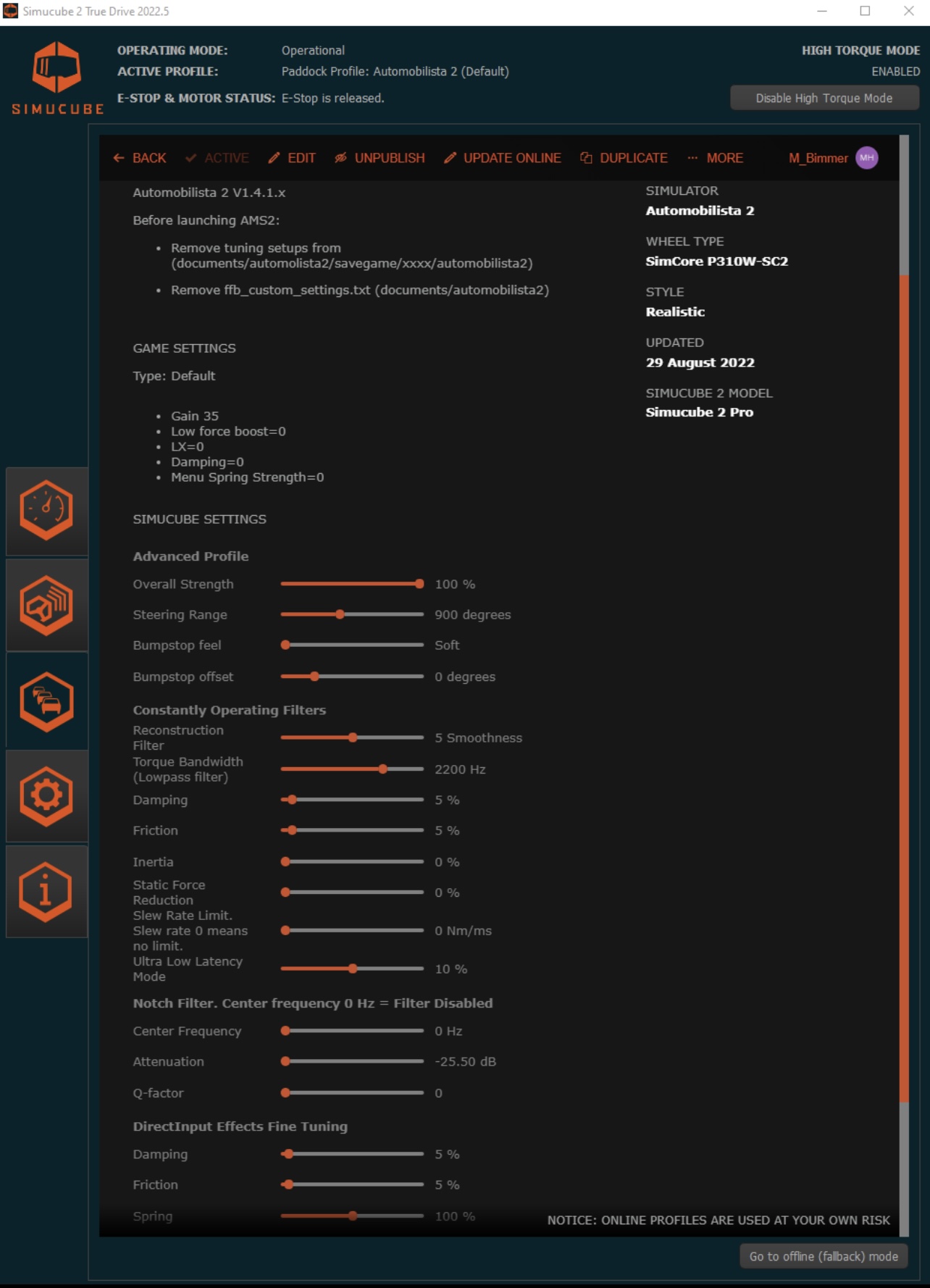
Is there any way to increase the gyro effect in AMS2 and maybe reduce the activeness? Porsche cup car in Oulton park is just so bumpy and active and I would like a smoother ride. Reduced slew rate and some dampning made it better but not sure what to dial in more.
I think these settings work great.
Ingame, only 20% dampning and default+
I have a Simucube Ultimate and GSI wheel, HPP pedals, I can’t get the wheel assigned, it keeps saying multiple inputs detected, I followed other posts here and set up the pedals first then unplugged the pedals, then tried to set up the wheel but same issue. Any one had this issue? Thanks in advance.
Try the follwoing: When assigning the steering axis, move your wheel ~360° in the direction you want to assign and then back to center immediatly. If you turn it too far or hold it at 360° you’ll get the “multiple inputs detected” error. Madness Engine bug, holdover from PC2.
Maybe turn off FFB while assigning to make it easier.
That worked for me aswell. You have to turn fast in the opposite direction. I can’t remember if I also changed the wheel range to a smaller number in TD for assisting and then resettet it
I got it working, I had to press the E-Stop then it was able to detect the simucube. That was very strange but it worked. Now I have ZERO FFB, will tackle this now.
AMS2 overall hasn’t the best FFB. Formula cars are very stiff, tracks flat. These cars don’t provide every little detail unless it’s about grip. This is not a filigran and sophisticated concert of Mozart. They are sucked to the track jump over details rather than analysing them. Curbs are most of the time just wild shaking. The real thrill is the very moment raiding on a razor blade and getting the info at the very edge. That abrupt loss of the car, or better the knowledge to stay away from that very tiny bit. Turn for turn, breaking point for breaking point, 90 minutes full of risky situations. That is where the Simucube 2 comes in, making all of this possible at the highest level. Compared to this masterpiece I am, as a racer, a blind worm digging in the dirt
Something definitely changed to the FFB with a recent revision (not sure which one though). The FFB is much lighter at low speeds (almost none existent) and then loads up a lot as vehicle speed increases. Doesn’t matter if using custom or default profile. Problem persists with both. Hopefully it’s corrected soon.
It was a nightmare to configure triple monitors and SC2 in the AMS2 wheel detection.
Now all is fine, and honestly, the game is not bad cause I have the SC2 pro, with my old wheel ts pc racer, it was not as great.
I use custom FFB, zero effect, only Static force filter with some cars with a too strong resistance in corners.
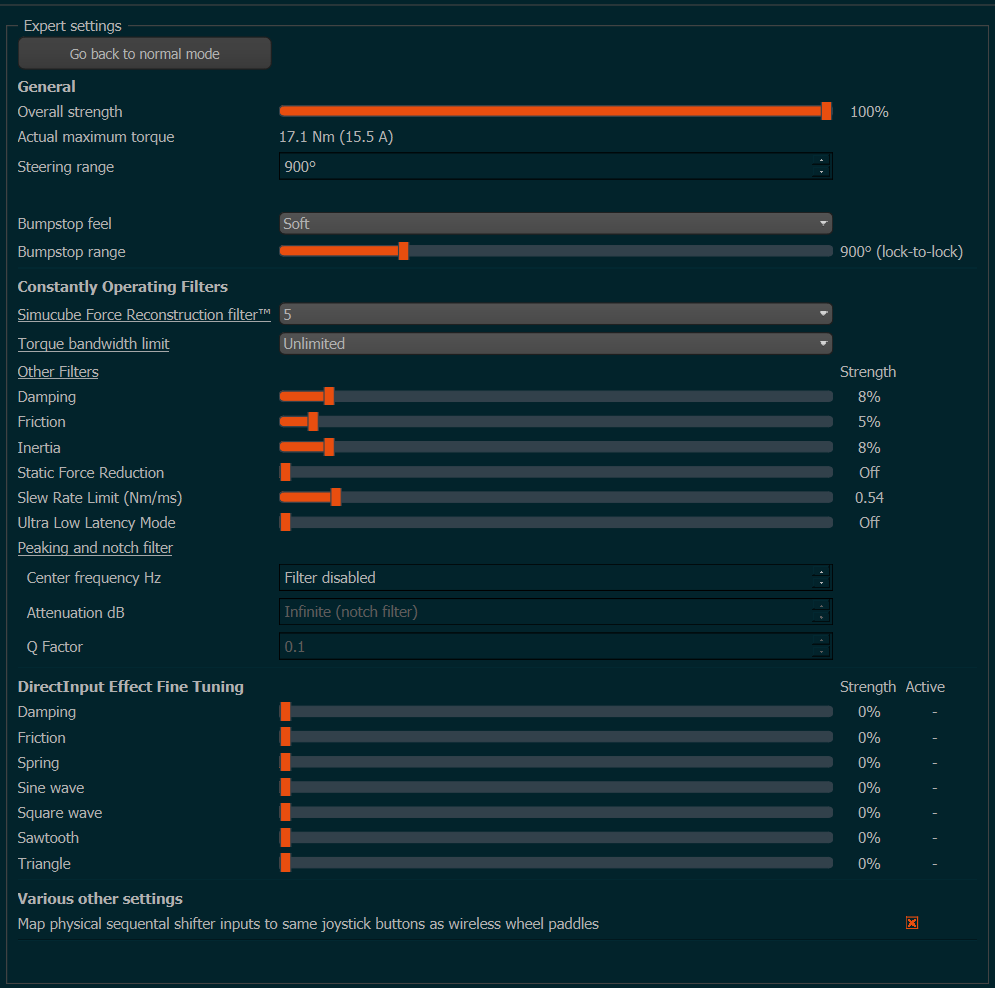
Been almost a year so it’s unclear if things improved a bit in AMS2 or have been more or less the same. Anyways, I gave AMS2 a try after V1.4 release and was wondering if damping is really needed in game (attaching my TD settings)
The AMS2 in-game ffb-Damping is Dynamic in nature. So, it is said to have greater influence on a per-car basis, resulting in more diverse steering characteristics.
The default Damping level is 50%, a decent starting point - depending on ffb mode (Default / Default+ / Custom). When using the in-game Damping, you should turn TD damping to 0%. I like to use some Friction in TD, as well.
Custom ffb profiles (some) may convert Damping to Power-steering so, read the author instructions contained in the custom file for recommended settings.
I use a custom profile with in-game Damping at 40% / LFB 0% / FX to preference.
i just use the custom basic file that comnes shipped with the game, it’s the best i have come across, the default and default plus feel too slidey and all customs don’t feel good to me, the basic unedited custom file that ships with the game is steering rack only and feel much better