if you one day find your settings for more “realistic” feeling please feel free to share, if you have real life expierience with gt3 and/or similar i’m really interrested how this pans out (i dont have experience in such cars so i tend to find settings wich give me a “natural”/“plausible”/“reasonable” feeling)
i believe the simucube base and software is still best way to go for
Settings are as others have said very subjective…
These are what I have come up with my experience with both FFB Wheels and driving race cars in the past…
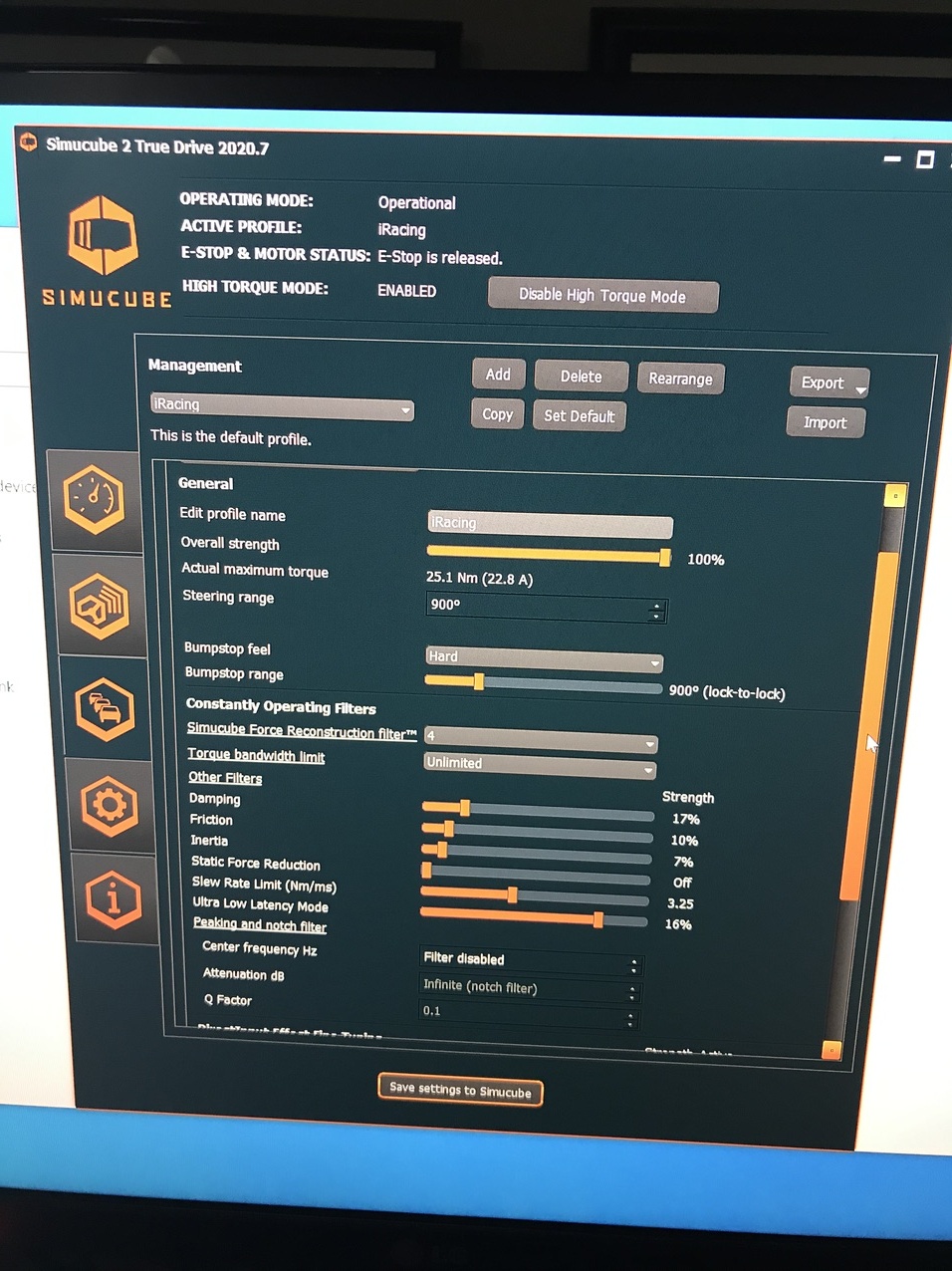
I do not really deviate from these settings for any car and run at a .595:1 ratio in iRacing which is 42Nm on the Max Force setting.
I mainly drive iRacing however with other games I have the Game strength set to around 50-60% I have to play with it a bit becasue other games are not as accurate in communicating the strength used.
One thing to note is that while realistic, they will always feel different from a similar car in real life as the digital tire is never the same as real and as you know if you do alot of Track days, just changing a tire type can cause a significant change in the way a car handles and feels.
Another thing of note is if the cars you are Tracking are production based the power steering systems are not of RACE style and generally will provide MUCH easier steering effort than a reface prep power steering system. With race prep systems they tend to use just enough pump power so the driver doesn’t fatigue (as quickly), this lets them get away with using smaller/lighter power steering pumps than you would find in your road prep cars.
1 Like
Yeah there is a private race track near my house that rents high end cars. GT3 is not the highest priced car by any means but it’s probably the best “track car there”. It has all of the top 20 times in the track
I personally would like to keep driving the more flashy cars like the Lamborghini and Ferraris but I would be interested in trying out the GT3 I am there. Given my experience so far I would say 15nm sort of feels the similar to what I experience on that race track, but I will def take in the suggestions above and just experiment. I will likely never be able to drive a real F1 car and wont have a reference to that driving experience. So as long as it feels good and i have fun, I will keep experimenting with the settings
Hello, what would be the conversion formula to get your .595:1 ratio on to an Ultimate wheel?
ie: if I have TD set to 100% 32nm, what would I need to set in iRacing (ie: your 42nm) to maintain the same strength the you have?
1 Like
32 (Ultimate 100% strength) divided by .595 (specific Output) = MAXFORCE value.
32/.595 = 53.781
So Max force at 54Nm with be a tiny tiny bit less at .592:1 (32/54=.59259)
Are you talking about a Porsche GT3 or an ACTUAL GT3 Race car?? Just curious as I have driven my friends 2018 Porsche GT3 RS and it is one heck of a car. Porsche Instructors say it is very close to a previous generation Porsche Cup Car…
After driving it I did some comparisons to iRacing and felt that (with the settings above for my wheel) the Street Spec Porsche GT3RS is about .45:1 Specific output with the Prior Gen Cup Car, However, that being said if you put the GT3RS on slick tires that number would go up and would probably fall in the .5 - .6 range as Slick tend to load everything more given their maximum grip level increases significantly.
F1 cars are interesting though… I haven’t of course driven one but given the iRacing versions are built off of actual data fro the teams I would expect their relative differences to be correct (since iRacing holds are cars in the same force scope). With that the F1 cars are actually MUCH lighter in steering weight than most of the GT3 Race cars and even the lower ranked F3’s, etc… I was a little surprised at this until I though about the nature of the cars…
My theory is that the F1 cars do have additional steering boost to make them lighter in real life due to the tremendous additional forces exerted on the driver by way of G-Forces. This keeps a driver able to not completely deplete their energy by balancing their exertion as if they had IndyCar level non power steering weight in addition to Massive Cornering, Braking, and acceleration G’s, the drivers would be absolutely exhausted at the end of a race (which you actually do see every so often in IndyCars) but very, very, rarely in F1. Granted in Sim you don’t get the G-Forces so the car feels pretty light comparatively.
If you have a Motoec file from a few laps then I can give you very specific statements and tips for a better FFB.
Unfortunately, it only works with IRacing and RFactor2.
Yeah, Porsche GT3 RS
Ah thanks Brion! I didn’t realise it was such a simple Formula.
Do you by chance have a formula for working out the best slew rate for an Ultimate wheel?
Or is 3.25 a good setting for all wheels?
What’s slew rate and what does it do?
I believe, but don’t quote me, it slows down the reaction time of the wheel when lots of FFB is being sent to the wheel.
So if you go over a kerb, it doesn’t forcefully throw the wheel from side to side in a split second. It slows down the reaction time to make it smoother.
I think.
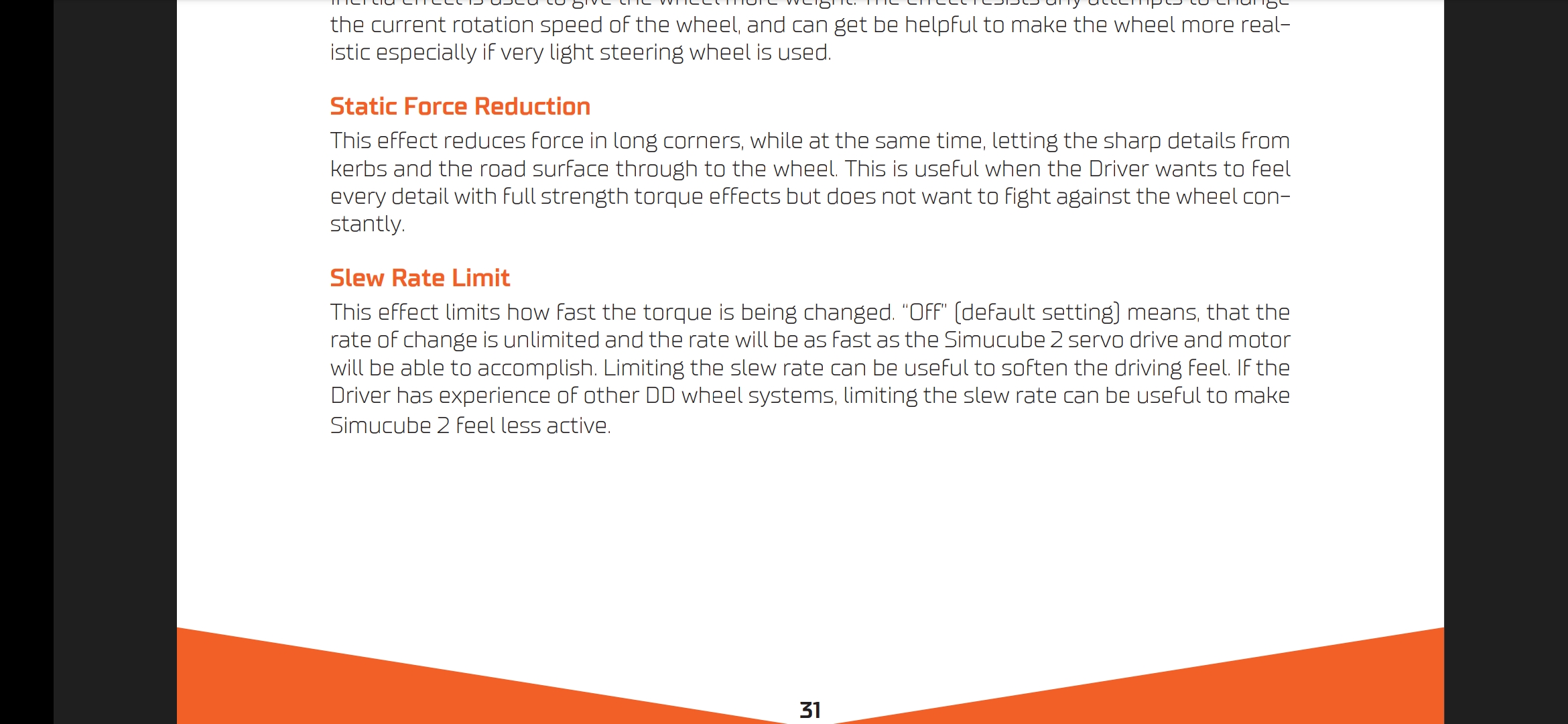
Yea the specific output is just a ratio of the actual output from the wheel to the output that the telemetry gives.
With Slew… No, that is something you sort of have to feel out. The thing to look for is if the wheel feels as if it is causing you to saw at it…
Most of the time that I notice this is on a return to center moment after a minor oversteer. Normally in a real car you should be able to control a slight oversteer with minor adjustments to the wheel. However a wheel that is too fast will snap back toward center at a rate that you as the driver cannot keep up with… This causes you to saw at the wheel a bit to regain control and find center where in reality you should be able to use just throttle control and slight inputs to bring the car back in line…
Some people like this quick snap back as it makes them feel the car is being reactive (and some cars depending on settings in the suspension or track surface can be(i.e older style nascar cars on an oval where they are setup biased and you se the car get loose and they ca hold onto it JUST until the put too much correction and it shoots to the wall) Problem is with an overly active return this shoot to the wall no longer has to do with the car but the return uncontrolled overcorrection of the wheel.
So it is something that does have to be played with and becasue I don’t have an ultimate I cannot really say what would be a good setting… However I would say that you will probably be around the same number as the Slew is a torque application over time.
F1 cars are, compared to F3, much more easier to steer when we talk about the force needed. Some of actual F1 drivers said that steering in F3 was very demanding, due to the lack of power steering.
It’s the acceleration of the motor. Lowering slew rate makes the steering more rubbery/realistic.
Turn it down to 1 and hit some curbs. You’ll notice what it does then.
The difference between 3.25 and unlimited is not so obvious, but once you go below 2 you’ll feel the difference.
I drive with slew rate 2.2. It’s a good compromise between detailed info, but a realistic/less robotic feeling.
1 Like
We have TBW, Slew Rate limit, all these params limit physical potential of the servo.
You’ve paid extra for more reactive motor but run it on a fewer cylinders.
More “rubber” and wheel weight can be accomplished via Damper/Friction/Inertia, also Recon if you want smoother signal. It’s a more conventional, traditional way without resorting to “exotic” params very few understand and killing your servo potential in the process.
Overcomplicating things seems to be a trend among simracers.
1 Like
no, lower value is less reactive. But outright 0 means that the filter is turned off.
2 Likes
Really, I thought it was changed to be the actual limit applied on the top of existing rate. Seems like it’s still absolute value of a Slew Rate. Thanks for correcting, may be a good idea make it look more meaningful in UI.
Yeah, we actually discussed it when implementing the slider for the effect. Either way it would be confusing in some way - if the slider was “inverted” compared to how it is now, the value on the slider would decrease when moving it to the right. Then again, we prefer technical explanation of an effect instead of just arbitary number. However in this case the technicality is what makes it confusing.
Same goes for the torque bandwidth limit filter if that was implemented as a slider…
2 Likes
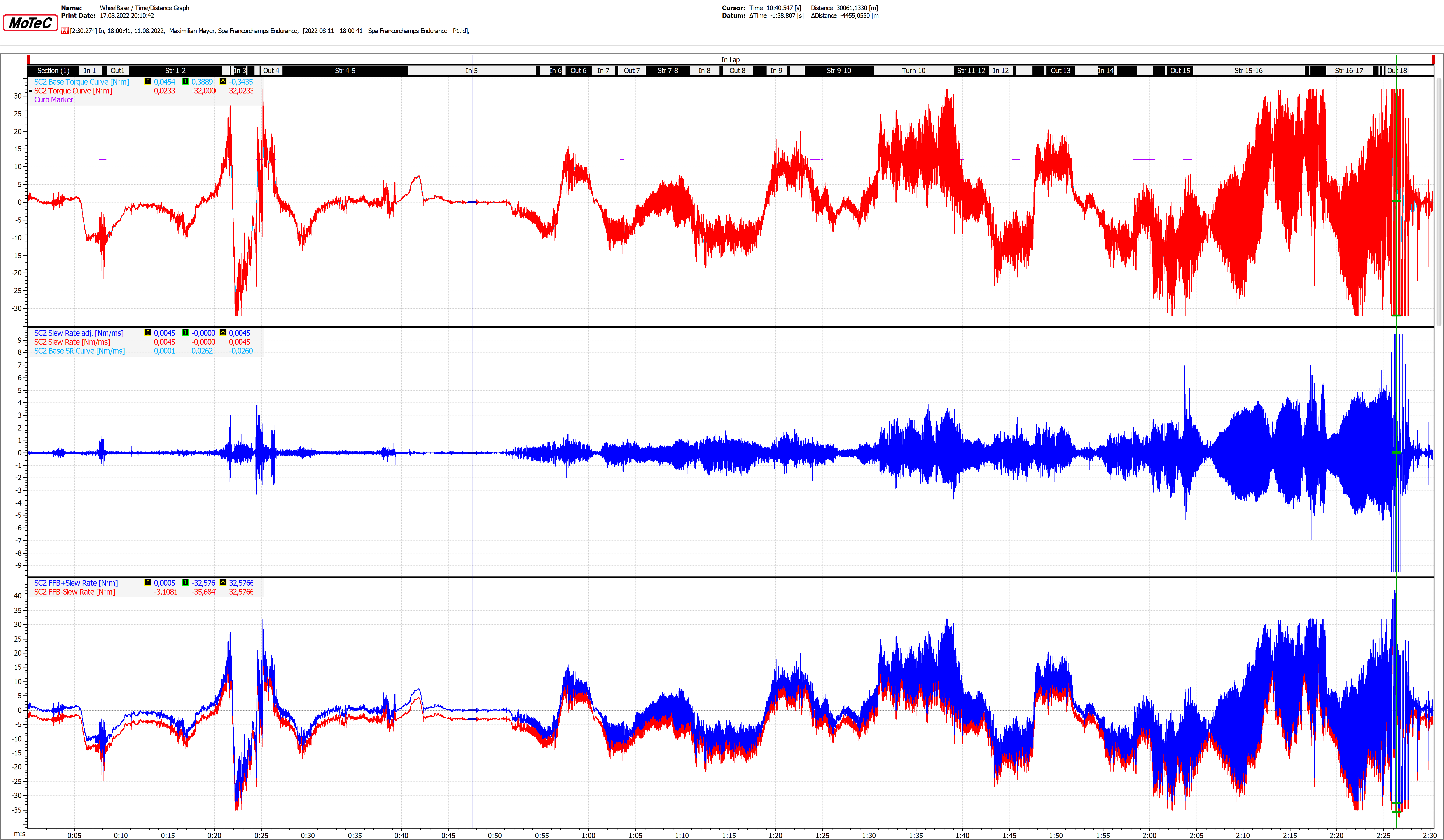
Slew Rate is the best “Effect” of the Simucube2! It is so POWERFULL. I use it simelar like a “Bass - Compressor” and you should do that too. You tune your FFB-Signal to its finest! Keep an eye Flat-Spots at the last half lap. Also the Crash at the End.
Slew Rate in dark blue…
0.1Nm/Ms
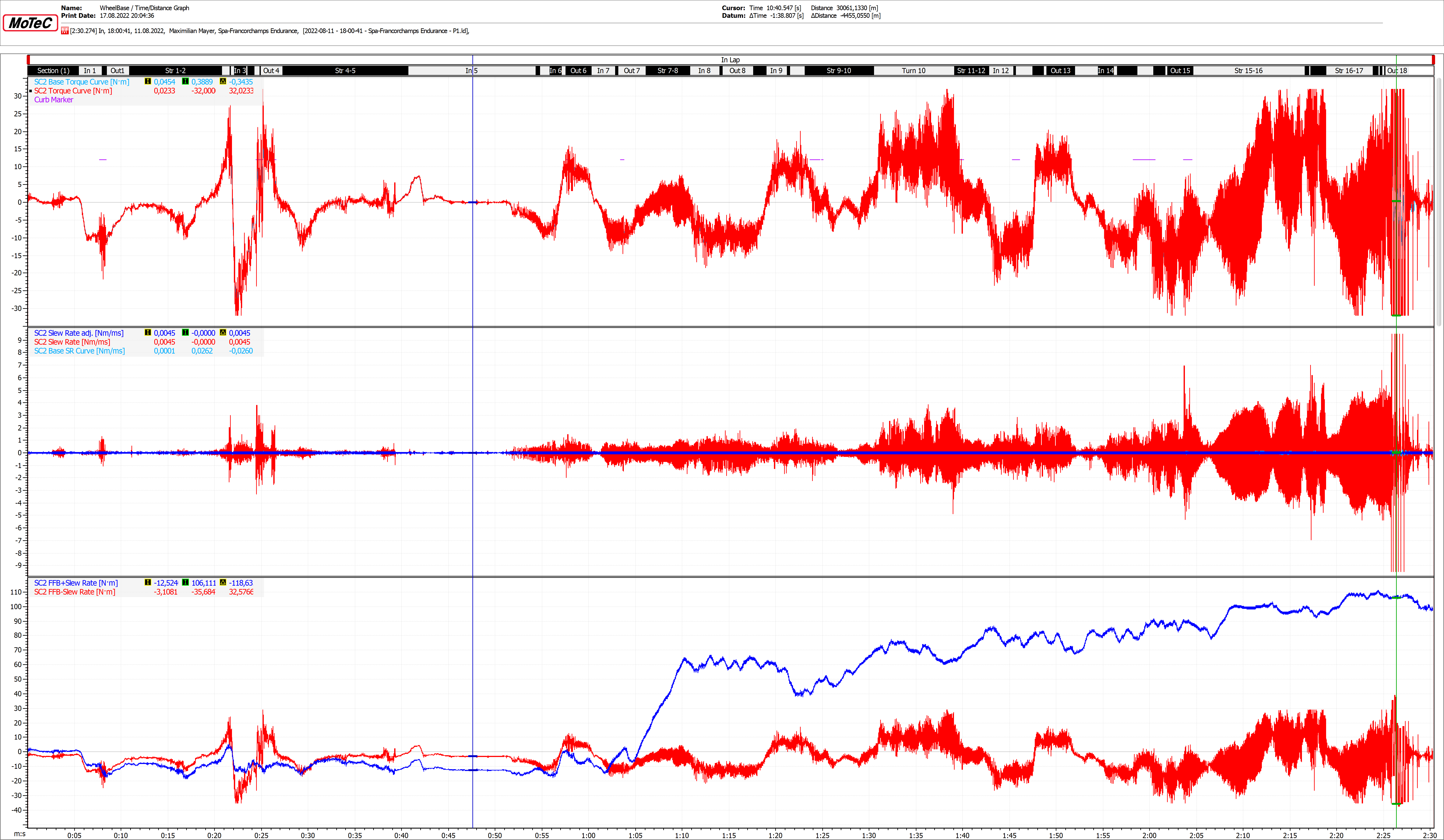
0.65Nm/Ms
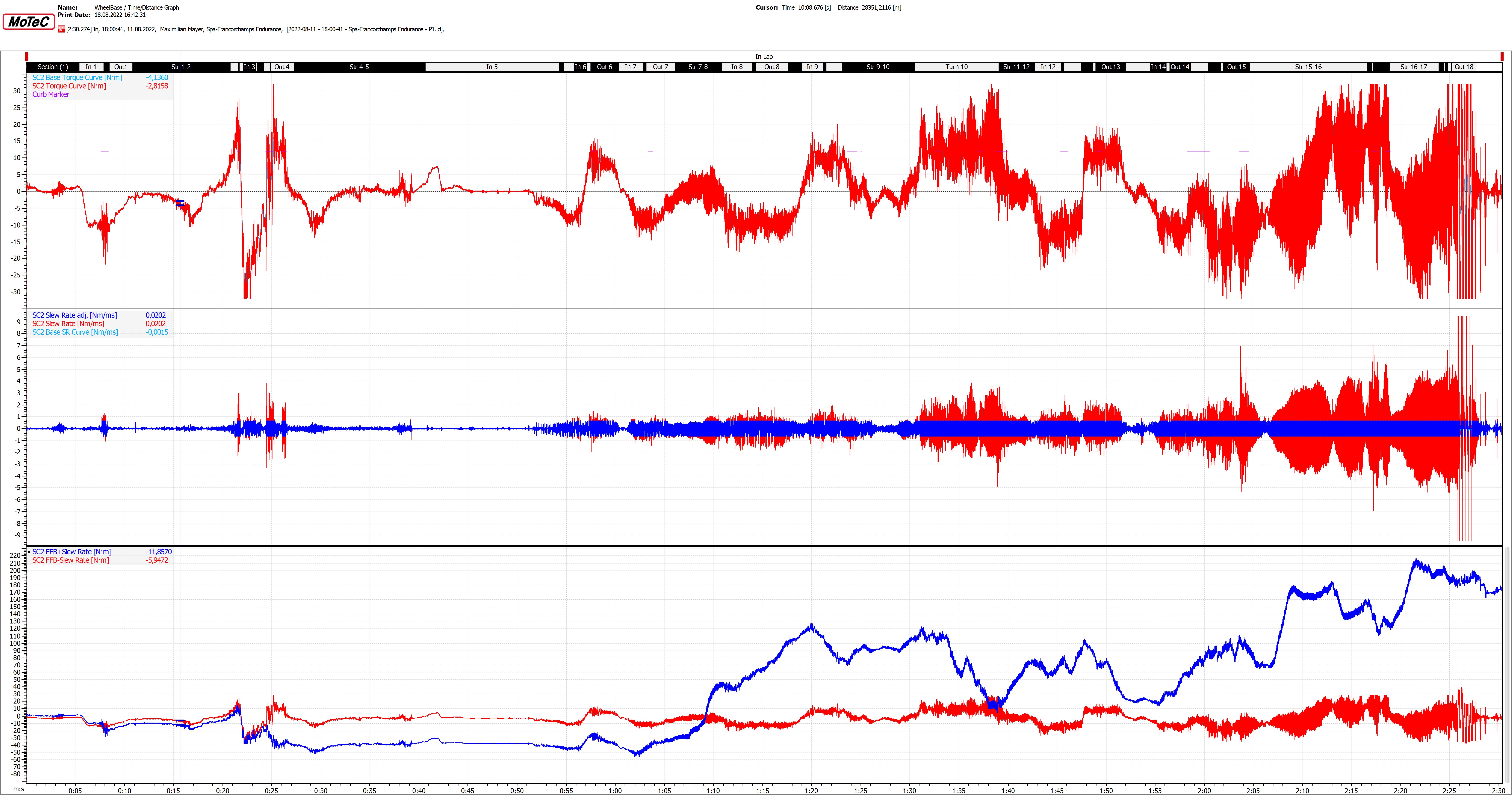
2.5Nm/Ms
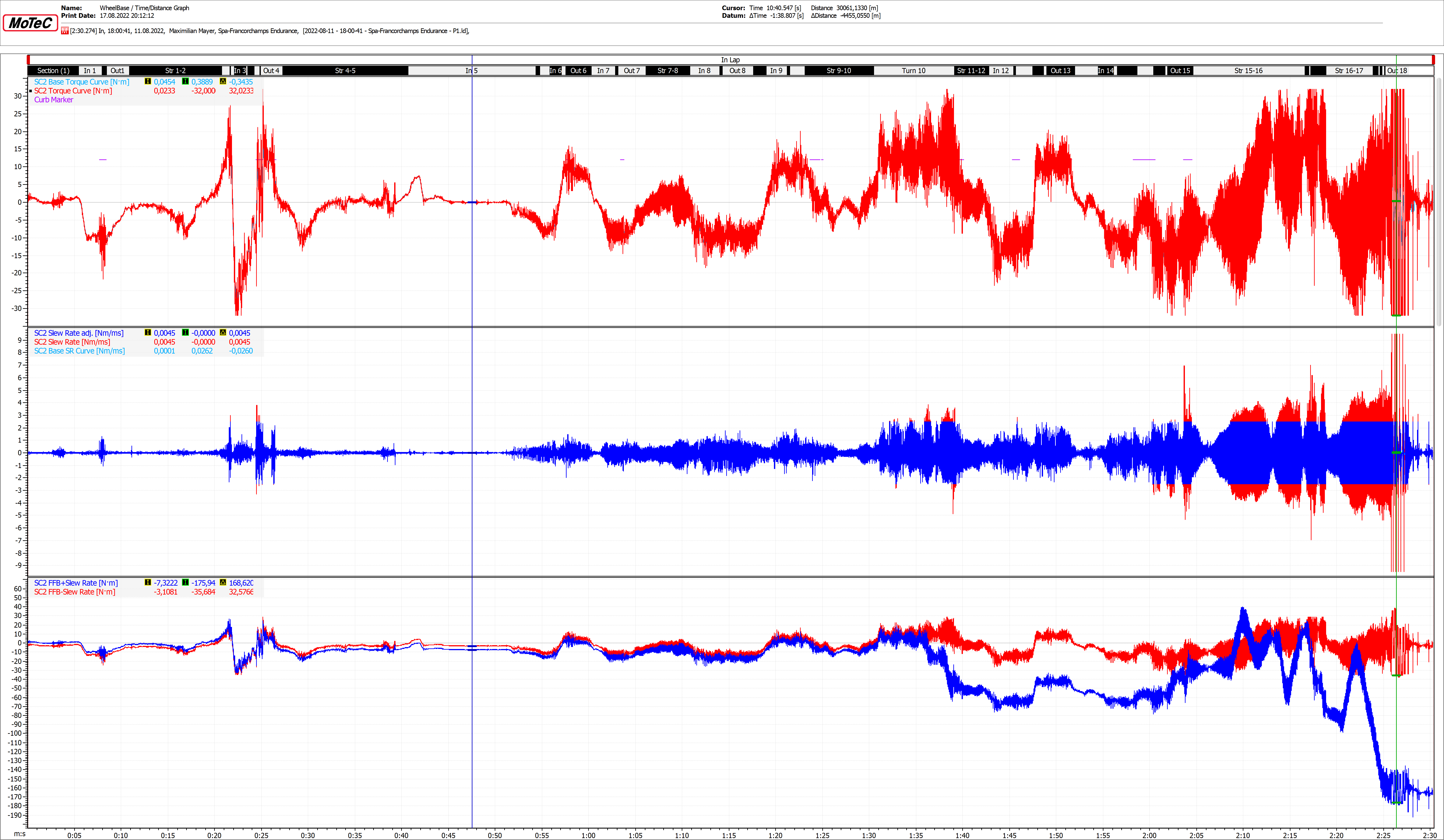
9.5Nm/Ms