I cannot even map my steering wheel base does not see it?
We have managed to find solutions for Simucube 3, and most likely there will be a testing release of Simucube Tuner soon with Simucube 2 FH6 support soon. Probably next week. Stable version probably after our summer holidays.
I’m also thinking of backporting this to Simucube 1.
4 Likes
Simucube Tuner 3.1.3 SC2-FH6
- Fixed crash on Forza Horizon 6 startup when using Simucube 2.
Note: Forza Horizon 6 requires Simucube 2 to be the first controller ID in Windows for FFB. Some community solutions can work around this by modifying the input mapping file of the game, which may help if you can’t get your device to be the first controller ID by other methods, such as unplugging devices. In some games where FFB was previously inverted, it might now be necessary to remove the inversion from the game settings to get the correct feel. This change could affect other games than Forza Horizon 6, please comment if you notice any unwanted changes.
This is otherwise the same as official Tuner 3.1.3 that was also released today.
We have included some Simucube 2 firmware size optimizations too, and those are included in this build. For this reason, we consider this a testing build and official build will be after our summer holidays, likely in August.
2 Likes
Thanks Mika, we appreciate it! I was waiting for this Tuner test release before getting FH6. But just to be sure, apart from the crashing issue, the FFB for SC2 works with this test release without the need for Vjoy, etc. Is that correct?
Yes, you are correct.
1 Like
how would I get my osw to work as cannot use tuner? but I use the simucube software
There could be a a testing release for Simucube 1 before my summer holiday.
Spent a couple of hours today testing and although the ffb indeed works and feels good (only the simucube connected to pc), there is no way I can map the pedals (heusinkveld) without using vjoy and emuwheel. So at the end of the day i have to use these, thus I am not sure if there is any benefit.
If somebody has any ideas for how this can work without emuwheel, I would be very interested to know.
Emuwheel works great. You have to be super careful inputting the wheel when setting up. There is a separate configurator tool that makes it less sensitive to dd wheel input. Just copy paste into your existing orig emuwheel folder and replace when asked. One trick is to max friction so the wheel doesn’t vibrate.
EmuWheel-RE/Configurator: emuWheel’s configurator, decompiled, then patched
These are the settings I use for ffb in emuwheel and my true drive settings.
In game advanced control settings for ffb, leave all at default except tweak force feedback, road and offroad sliders, leave vibration slider all way to left. Set the wheel in truedrive to 540 as its way easier to catch slides in this game. The catch is the in game cockpit steering wheel only matches a 900 deg lock. I have a slight minimum increase in the emuwheel ffb settings for force and vibration as this helps the deadspot feelings when using the defaults. Also if you have vr check out:
Forza Horizon 6 VR mod v0.8.0 (Steam / Microsoft Store / GamePass) - NALULUNA’s Ko-fi Shop
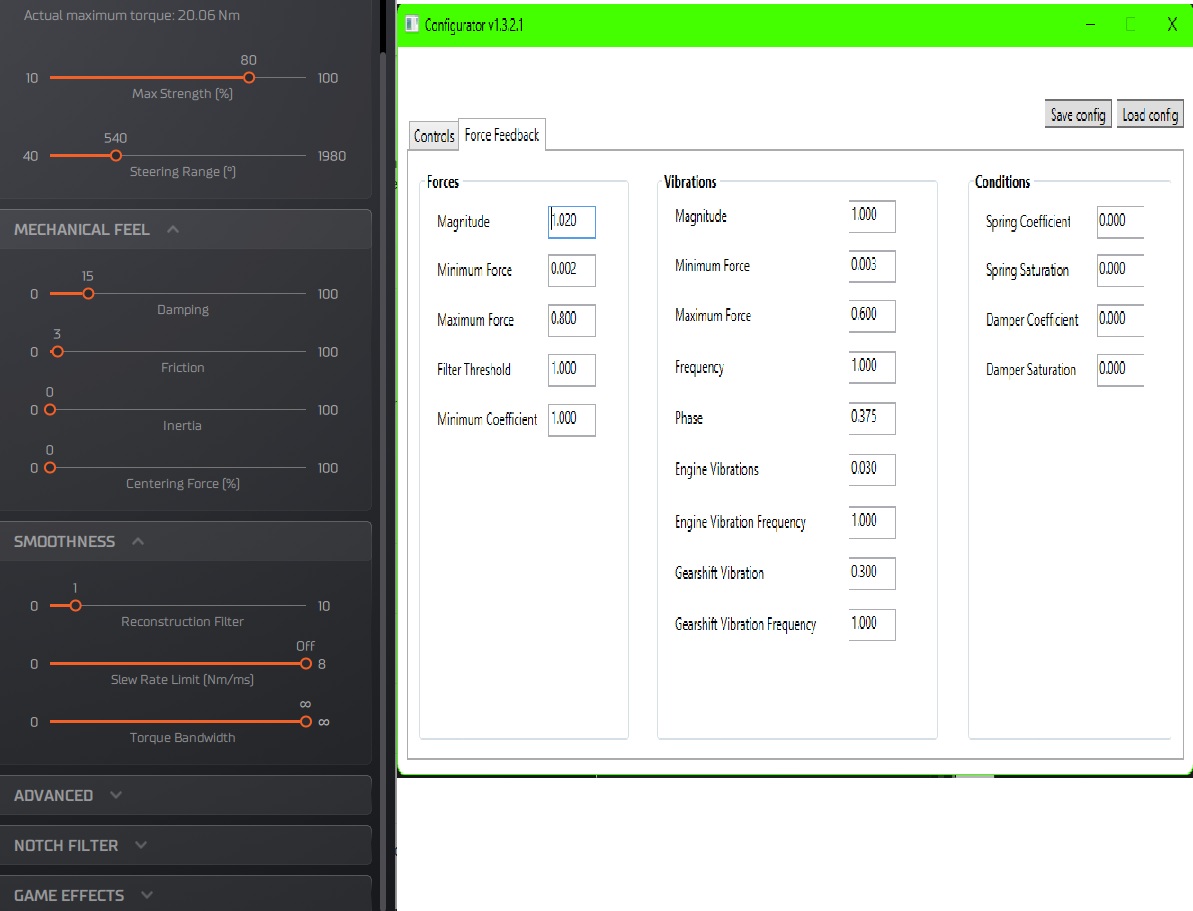
Hope this helps and of course by all means comment with your own prefs. Cheers!
Edit:Updated settings. May just sit on these for a while.
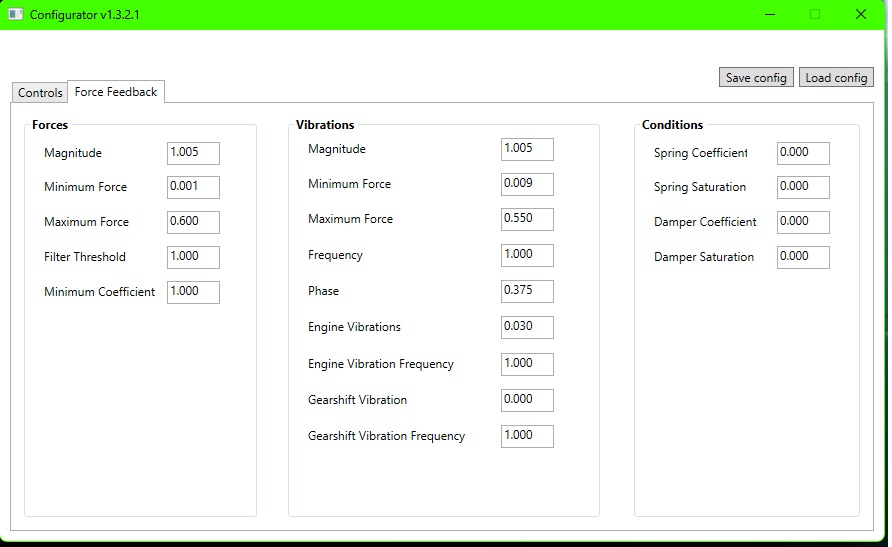
Any testing reports of the testing firmware are also appreciated.
I’m still on 3.09 tuner with my sc2pro. Is there any gud reason to upgrade the software for my base? Any improvements for sc2 users? Thanks.
There is the Tuner 3.1.3 + SC2 FH6 testing release above, that avoids the crash on FH6 startup.
All other Tuner changelogs can be found here:
https://docs.simucube.com/TunerSoftware/changelog.html
Namely there are also some improvements on the new Paddock - the old True Drive Paddock is not to be used anymore at all.
1 Like
Bro I’ve spent around 30hrs screwin with emuwheel just to get it all fine-tuned now. I may test the tuner beta at a later date once I’ve had my fill!  Soz but I’m officially over testing and potentially ruining my current setup.
Hi there, i have spent as well quite a few hours the last 10 days trying to figure out the native support of FH6 with the test release Tuner. For a the most time i ended up with emuwheel which felt ok but i could sense some lag here and there. Of course i didn’t do much of a tuning in the configurator file as my mind was stuck that i had somehow to make it work natively. The issue for me was that there is no way i could keep Simucube 2 as device 1 since my heusinkveld could not be hotpluged. Long story short, after some searching i managed to find HorizonSimtool in github which sorted out very quickly and easy all the issues with the device sequence once and for all.
So @Mika i can confirm this test Tuner works just fine, no lags, no dropped ffb or FPS, everything seems to be working natively without any issue. Of course, the FFB although fine and you can enjoy this game, there is not much sophistication/depth to it. Not sure however if this has to do with the Tuner firmware and if other wheels with “native” support give a better FFB feel.
@Disco_Dan mate, it would be interesting if you can check this too and report which route works best for you, emuwheel or not? Also, for the Naluluna mod, although it got it to running great (stable 90 fps with minimal frametimes at Extreme), it kind of gives me a tiny bit of nausea. Are you getting something like that? And also you cannot see the hud (map, etc.) unless i missed something.
Hi mate,
I will get to testing the tuner software at some point though I’m not too concerned as emuwheel gives great ffb once dialed in.
I’m running a psvr2 @90hz with a 2660x2660 res, dlss bal, Most settings on med except textures on ultra.Rt works surprisingly well in vr but too much cost for my 4090.
Here’s my settings. DIBR gives less issues for me, I keep the ipd right down or just a little to give minor stereoscopic effect.
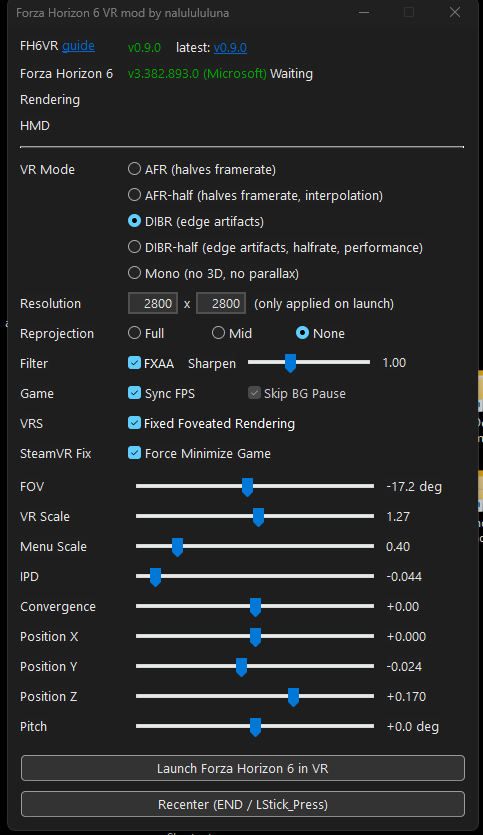
Ive forced on 16x af in nvidia inspector also and using latest dlss .dll, model preset m gives best perf, l looks cleaner but too much perf cost. I never get motion sickness so I cant help with that. If yu are using afr that would be the reason though. Try dibr without any reprojection and turn down th ipd to get rid of the ghosting / misalignment effect on items close to the cam.
As for the hud you can bring it a little closer into view using the safe frame sliders in fh6 settings menu though the sliders need extending to get the hud items into a usable screenspace. Just turn off the minimap and try to just jump to the big map quickly when needing to navigate. There are usually track markers, smoke to follow anyways so better to use them for full immersion.
1 Like